
VMware vCenter System Logs

Enter vCenter Server 2. Right Click in VMware vCenter Server and then click Export System Logs 3. Select logs to export, as shown in the next picture. 4. Then click Next and Finish to start the export process. 5. Select a folder and wait to finish the export process. Facebook Twitter LinkedIn WhatsApp
Vembu Backup for VMware vSphere
Requirements to Install Vembu Backup: In the next link is posible to see the requirements such as: Operating System, RAM, CPU and others for a best performance in Create and Restore Backups and replicate virtual machines. https://www.vembu.com/guide/vembu-bdr-suite/5-5/en/bdr-backup-server.html Before to do a deployment we highly recommend to use the next guide: https://www.vembu.com/guide/vembu-bdr-suite/5-5/en/bdr-backup-server.html First Part: Installation Vembu […]
Esxi Host Profile Reset Root Password
Go to Host Profile in your VMware vCenter Server 2. Edit root password in the Host Profile 3. Type Password Fields according with the requirements. 4. Put the Esxi Host in Maintenance Mode. 5. Right Click on Esxi Host and Then click to Remediate. 6. After Remediate the ESXi Hosts are ready to enter with […]
SOLVE SRM NETWORK ERROR
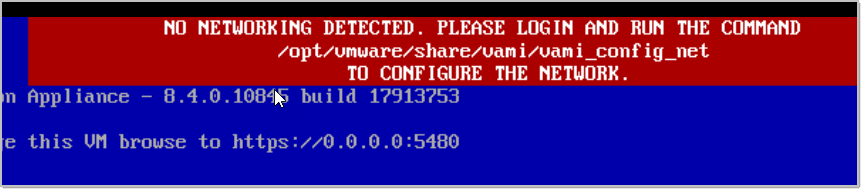
Get Configuration /opt/vmware/share/vami/vami_config_net Get the interface names with: /opt/vmware/share/vami/vami_interfaces Set the IP for the desired interface: /opt/vmware/share/vami/vami_set_network eth0 STATICV4 192.168.17.17 255.255.255.0 192.168.17.1 Set DNS: /opt/vmware/share/vami/vami_set_dns -d credivisa.local 172.17.0.23 172.17.0.24 Reboot the appliance and will be ready to use. Facebook Twitter LinkedIn WhatsApp
Create RvTools Inventory
Previous Task: Donwload RvTools from https://robware.net/rvtools/download Install RvTools 2. Open RvTools 3. Enter credentials for vCenter Server with Username and Password: 4. Validate the information 5. Export the information to excel 6. Save the information 7. Locate the information and then share the Excel file Facebook Twitter LinkedIn WhatsApp
Create New Datastore
Previous Task: Validate that it is presented from storage to ESXi. Create a Datastore: Rescan all the hosts of the cluster 2. Select VMFS and Storage Devices 3. Validate Rescan Process 4. Add New Datastore 5. Select VMFS 6. Select a host 7. Select LUN with LUN ID and change the name 8. Select VMFS-6 […]
Create Customization Specification
Create Customization for Windows Virtual Machines Click VM Customization Specifications to Start the Process. 2. Enter a Name, select vCenter Server, select Windows and Check Generate a new security identity (SID) 3. Enter Owner name and Owner Organization 4. Specify the Computer Name is recommended to use the same virtual machine. Then click Next. 5. […]
Virtual Machine Creation
Create Virtual Machine using a VM Template Enter a Virtual Machine Name and then click Next. 2. Select a compute resource and then click Next 3. Select storage to store virtual machine files and then click Next 6. Click Finish to deploy 5. Select the customization specification 4. Select the clone options as is showed […]
vSAN Disk Fault
First Step: We need to Update the firmware for the Raid Controller and UCS VIC:Cisco 12G SAS Modular Raid ControllerRunninng:lsi-mr3 7.703.19.00-1OEM.670.0.0.8169922 Recommended:Driver Version 7.706.09.00-1OEM.670.0.0.8019320UCS VIC 1227 10-Gbps 2 port CNA SFP+(Cisco)Runninng:nenic 1.0.25.0-1OEM.670.0.0.8169922Recommended:Driver Version […]
Configuring ESXi for SNMPv3
In this post I will show you how to configure and enable SNMPv3 traps in VMware vSphere 6.7 or later. In this post I will show you how to configure and enable SNMPv3 traps in VMware vSphere 6.7 or later. First Step: Get the MAC Address on ESXi Host: Command: esxcfg-info | grep “Mac Address” […]